
Wire up four Claude Code subagents - planner, coder, tester, reviewer - into one pipeline that takes a single feature request and hands you a finished, reviewed branch by morning. Each stage writes its output to a shared .pipeline/ folder that the next stage reads, and one slash command runs all four in order with gates between them.
This is for engineers already running Claude Code who want unattended feature work without losing control. You will create four subagent files, one orchestrator command, and trigger the chain with /ship <feature>. Everything here matches Claude Code's current subagent and slash-command format as of May 2026.
Prerequisites
- Claude Code installed and authenticated against your account.
- A git repository with an existing test framework the Tester can match (Vitest, Jest, pytest, go test, etc.).
- Plan access to both Opus and Sonnet models. The Planner and Reviewer run on Opus; the Coder and Tester run on Sonnet.
- Working familiarity with the
.claude/project config directory. - A clean working tree. Commit or stash pending changes before a run so the Reviewer's
git diffreflects only the pipeline's work.
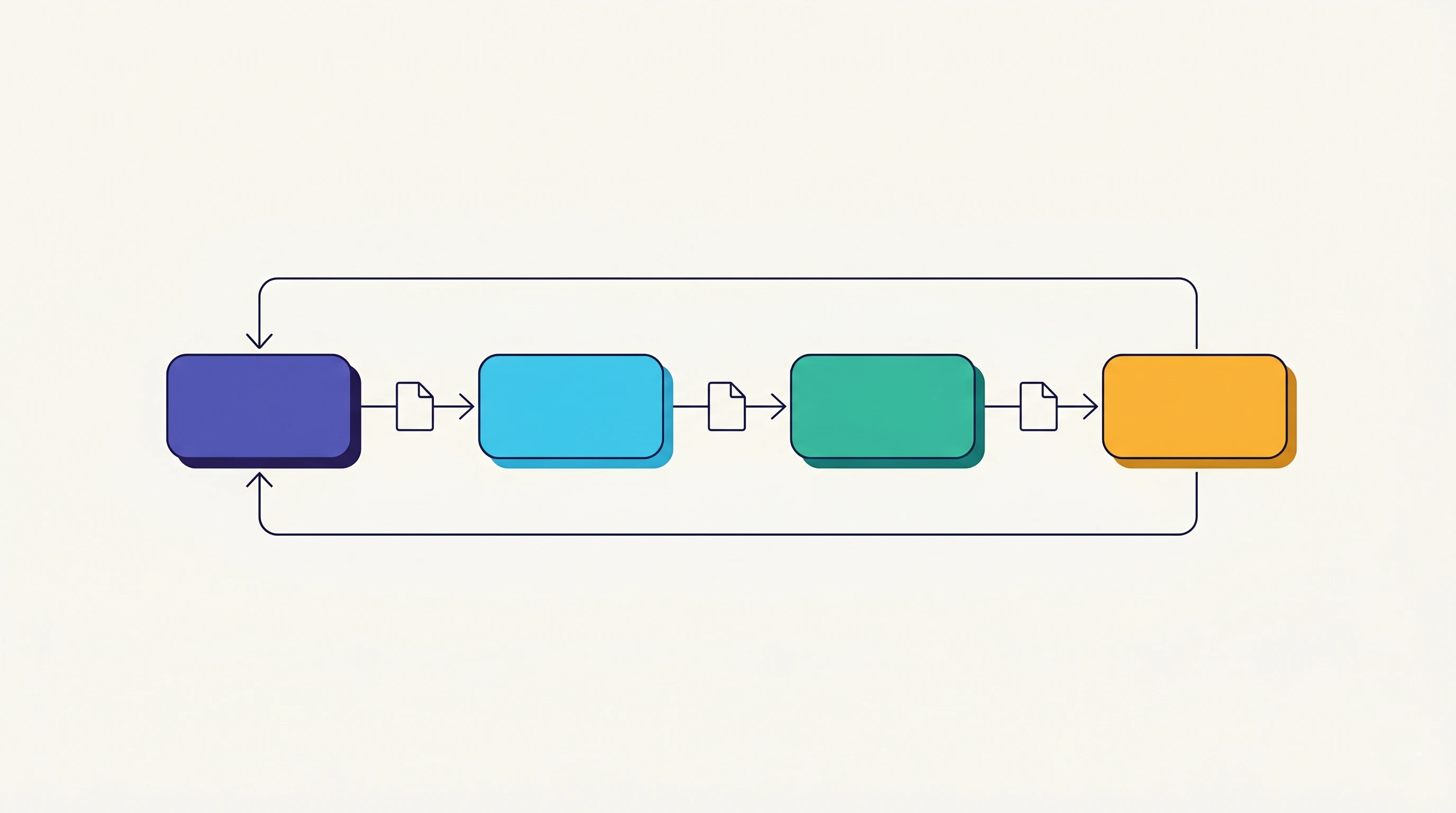
The shape is deliberately small: four specialists, one shared folder, one command. The orchestrator command is a minimal agent harness - it sequences the stages and checks each handoff file exists before starting the next. The reason to split the work is context hygiene. One agent doing planning, coding, testing, and review fills its context window with four jobs' worth of noise and quality drops. Four narrow agents each stay in a clean, focused context.
Step 1. Create the handoff folder
Purpose: give every stage one shared place to read the previous stage's output and write its own.
mkdir -p .pipeline
echo ".pipeline/" >> .gitignore
Expected result: .pipeline/ exists and is ignored by git. The handoff files are transient artifacts, not source, so they stay out of commits and out of the Reviewer's diff.
If this fails, delete the folder with rm -rf .pipeline and recreate it.
Step 2. Create the Planner subagent
Purpose: turn a vague feature request into a concrete spec the Coder can follow without guessing. The Planner never writes implementation code.
Create .claude/agents/planner.md:
---
name: planner
description: Turns a feature request into an implementation spec. Use as the first stage of the feature pipeline.
tools: Read, Grep, Glob, Write
model: opus
---

You are a planning specialist. You do NOT write implementation code.

Given a feature request:
1. Read the relevant parts of the codebase to understand current patterns.
2. Write a spec to `.pipeline/spec.md` containing:
   - Files to create or modify, with exact paths
   - The interface or function signatures needed
   - Edge cases the implementation must handle
   - Which existing patterns to follow (name the file to copy from)
3. Flag anything ambiguous as an OPEN QUESTION at the top of the spec.

Keep the spec tight. The Coder reads this and nothing else, so leave
no gaps and invent no requirements that weren't asked for.
Run the Planner on Opus (currently Opus 4.8). This stage sets the quality ceiling for everything after it: a vague spec produces vague code no matter how good the Coder is. The tools - Read, Grep, Glob, Write - give it everything to inspect the repo and write the spec, and nothing to edit source.
Expected result: the file exists and /agents lists planner in its Library tab.
If the agent does not appear, check the frontmatter parses: name and description are required and the file must start with --- on line one.
Step 3. Create the Coder subagent
Purpose: read the spec and write the implementation. The Coder does not plan and does not review its own work.
Create .claude/agents/coder.md:
---
name: coder
description: Implements the spec at .pipeline/spec.md. Use as the second stage of the feature pipeline, after the planner.
tools: Read, Write, Edit, Grep, Glob, Bash
model: sonnet
---

You are an implementation specialist.

1. Read `.pipeline/spec.md` in full. If it has OPEN QUESTIONS, stop and
   surface them instead of guessing.
2. Implement exactly what the spec describes. Follow the patterns it
   names. Do not add features it didn't ask for.
3. Write a short summary to `.pipeline/changes.md`: which files changed,
   what each change does, and anything the Tester should focus on.

You write code that matches the repo. You do not refactor unrelated
code or "improve" things outside the spec's scope.
Sonnet (Sonnet 4.6) is the right call here. Implementation against a clear spec is the balanced cost-quality work Sonnet handles well, and you do not want Opus prices on the longest stage. The summary at .pipeline/changes.md is what lets the Tester target the right surface instead of testing blind.
Expected result: coder appears in /agents, with Bash and Edit in its tool set.
If the Coder stalls on an ambiguous spec, that is the gate working - the Planner left an OPEN QUESTION. Resolve it and re-run.
Step 4. Create the Tester subagent
Purpose: read what changed, write tests that prove the feature works, and run them. The Tester never fixes code.
Create .claude/agents/tester.md:
---
name: tester
description: Writes and runs tests for changes described in .pipeline/changes.md. Third stage of the feature pipeline.
tools: Read, Write, Edit, Grep, Glob, Bash
model: sonnet
---

You are a test specialist.

1. Read `.pipeline/changes.md` to see what was built and where.
2. Read the changed files and the spec at `.pipeline/spec.md`.
3. Write tests covering: the happy path, the edge cases the spec named,
   and at least one failure case. Match the repo's test framework.
4. Run the tests. If any fail, write the failures to
   `.pipeline/test-results.md` and STOP. Do not fix the code yourself.
5. If all pass, note that in `.pipeline/test-results.md`.

You test behavior, not implementation details. A failing test means
the pipeline pauses for the Reviewer, not that you patch around it.
The hard rule is that the Tester writes tests but does not touch the code under test. If it could fix the implementation to make tests pass, you would lose the signal that something is wrong. A red result stops the pipeline for a human.
Expected result: tester registered. After a run, .pipeline/test-results.md holds either a pass note or the failing output.
If the Tester picks the wrong framework, it usually means the repo has more than one. Name the framework in the request or add it to the spec.
Step 5. Create the Reviewer subagent
Purpose: read everything the pipeline produced and give a verdict before any of it reaches your main branch. The Reviewer is read-only.
Create .claude/agents/reviewer.md:
---
name: reviewer
description: Final review of the full pipeline output. Fourth and last stage before human sign-off.
tools: Read, Grep, Glob, Bash
model: opus
---

You are a senior reviewer. You are read-only. You do not edit code.

1. Read the spec, the changes summary, and the test results from
   `.pipeline/`.
2. Run `git diff` to see the actual changes.
3. Assess: does the code match the spec? Are the tests meaningful or
   superficial? Any security, performance, or correctness issues?
4. Write a verdict to `.pipeline/review.md`:
   - VERDICT: SHIP / NEEDS WORK / BLOCK
   - For NEEDS WORK or BLOCK, list exactly what to fix and where.

Be the last line of defense. If the tests are green but the code is
wrong, say BLOCK. Green tests are not the same as correct behavior.
The Reviewer gets no Write or Edit tool on purpose. It can read, run git diff, and judge, but it cannot paper over a problem by editing the code. Back on Opus, because catching a subtle correctness bug that green tests missed is exactly the high-stakes judgment Opus is for.
Expected result: reviewer registered with no write access. After a run, .pipeline/review.md opens with a single VERDICT: line.
If the verdict is missing, the Reviewer likely ran out of context reading large diffs. Keep features small enough that one diff fits comfortably.
Step 6. Create the orchestrator command
Purpose: turn four separate agents into a pipeline. One slash command invokes them in order, each picking up the handoff file the last one wrote.
Create .claude/commands/ship.md. This runs in your main conversation, which is what makes the chain work: subagents cannot spawn other subagents, but the main thread can delegate to each in turn.
Run the full feature pipeline for: $ARGUMENTS

Execute these stages in order. Do not skip ahead. After each stage,
confirm the handoff file exists before starting the next.

1. Delegate to the `planner` subagent with the feature request above.
   Wait for `.pipeline/spec.md`.
2. If the spec has OPEN QUESTIONS, stop and show them to me. Otherwise
   delegate to the `coder` subagent. Wait for `.pipeline/changes.md`.
3. Delegate to the `tester` subagent. Wait for `.pipeline/test-results.md`.
   If tests failed, stop and show me the failures.
4. Delegate to the `reviewer` subagent. Show me `.pipeline/review.md`.

Report the final verdict. Do not merge anything. Leave the branch for
my morning review.
The $ARGUMENTS token expands to whatever you type after the command name. The two gates - OPEN QUESTIONS after planning, failed tests after the Tester - are where the pipeline stops and waits for you instead of plowing ahead on a bad foundation.
Expected result: /ship shows up in your slash-command list with the feature-pipeline description.
If the command does not appear, confirm the file is at the project path above and the filename matches the command name you expect.
Step 7. Trigger the pipeline
Purpose: run the full chain on a real feature on a fresh branch.
git switch -c feat/login-rate-limit
claude
Then, inside the session, type:
/ship add rate limiting to the login endpointThe orchestrator delegates to each subagent in sequence, pausing only at a gate. Watch the .pipeline/ files appear in order: spec.md, then changes.md, then test-results.md, then review.md.
Expected result: four handoff files written, a verdict printed, code on your branch, and nothing merged.
If the run stops early, read the file it stopped on - it holds the open question or the test failure you need to resolve before re-running.
Step 8. Run it unattended overnight
Purpose: kick the pipeline off in headless mode so it runs to completion without you sitting at the prompt.
git switch -c feat/login-rate-limit
claude -p "/ship add rate limiting to the login endpoint" \
  --dangerously-skip-permissions \
  2>&1 | tee .pipeline/run.log
Print mode (-p) runs non-interactively and exits when the pipeline finishes. Skipping permission prompts is what lets the Coder and Tester run Bash unattended, so only do this on a branch, in a repo you trust, never against production credentials. The tee captures a full transcript you read over coffee.
Expected result: by morning, the branch holds the implementation and tests, and .pipeline/review.md holds the verdict.
Be honest about the trade-off: in headless mode the gates cannot pause for your input. When the Planner raises an OPEN QUESTION or the Tester reports a failure, the orchestrator surfaces it and the run ends there. That is the correct behavior - it stops rather than guessing - but it means an ambiguous request yields an early exit, not a finished feature.
Verify
Confirm all four agents and the command are registered:
ls .claude/agents/        # planner.md coder.md tester.md reviewer.md
ls .claude/commands/ship.md
After a run, confirm the full handoff chain wrote and the verdict landed:
ls .pipeline/             # spec.md changes.md test-results.md review.md
head -1 .pipeline/review.md   # VERDICT: SHIP / NEEDS WORK / BLOCK
Confirm nothing was merged and the work sits on your branch:
git status                # changes on feat/* branch, main untouched
git log main..HEAD --oneline
Prove the gates fire by running an intentionally vague request once. The pipeline should stop after planning with an OPEN QUESTION instead of producing code. If it writes code anyway, tighten the Planner's instruction to flag ambiguity.
Rollback
The pipeline never merges, so a bad run leaves your main branch clean. Discard the generated work on the feature branch:
git restore --staged --worktree .   # revert tracked edits
git clean -fd                       # remove newly created files
git switch main
git branch -D feat/login-rate-limit
To remove the pipeline itself, delete the five files you added:
rm .claude/agents/planner.md .claude/agents/coder.md \
   .claude/agents/tester.md .claude/agents/reviewer.md \
   .claude/commands/ship.md
What rollback does not undo: any external side effect a Bash step ran. The Coder or Tester may have installed packages, written to a database, or hit a network service. Read .pipeline/changes.md and the run log to find those, and reverse them by hand. Git restore only covers files in the working tree, so package installs and migrations are the irreversible part, which is the real reason to run unattended pipelines on disposable branches and isolated data.
What's next
Once the chain is stable, harden it: run each stage in its own git worktree with the subagent isolation: worktree setting so parallel runs never collide, add a CI check that refuses to merge unless the Reviewer wrote SHIP, and feed failures back to the Coder for one automatic repair loop before the pipeline gives up. Keep features small. The whole design depends on each stage's context staying clean.